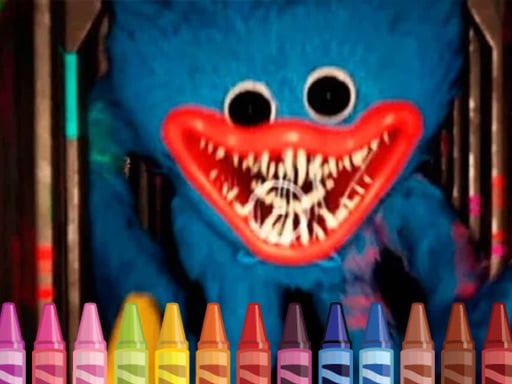
Hugie Wugie Coloring – The Ultimate Arcade Coloring Adventure You Can Play Right Now
Discover how the adorable yet slightly spooky blue monster from Poppy Playtime turns into a playful drawing buddy in “Hugie Wugie Coloring.” Whether you’re an arcade lover craving a break, a parent looking for a creative activity for your kids, or a casual gamer who just likes a good color‑in, this game blends charm, accessibility, and pure fun into one colorful package.
The Game in a Nutshell
| Feature | Detail |
|---|---|
| Title | Hugie Wugie Coloring |
| Type | Arcade, Coloring |
| Genre | Mobile / HTML5 |
| Resolution | 960 × 540 (optimized for all mobile screens) |
| Key Tags | fun, mobile, html5, coloring |
| Instructions | Use a mouse or tap the screen |
| Target Players | Boys & girls of all ages |
It sounds simple: color in drawings of Hugie Wugie, the big blue monster from Poppy Playtime (and a cameo star in Friday the 13th Friday Night Funkin’), and watch your creativity come to life. But don’t let that fool you—its friendly interface, vibrant graphics, and endless “paint‑and‑play” possibilities give the game depth that makes it a stand‑out in the arcade‑style catalog. Let’s dive in!
1. Attention‑Grabbing Intro: Why Coloring Meets Arcade in a Blue Monster
The world of arcade games often conjures images of flickering neon lights, chiptune beats, and high‑score chases. Yet “Hugie Wugie Coloring” invites you to a quieter yet equally thrilling space—one where the clack of pixels is replaced by the gentle swish of a color palette.
This isn’t just an app that lets you splash paint on static images. It’s an interactive color‑in experience that draws from the heart‑warming lore of Poppy Playtime and the underground popularity of FNF. A blue, fuzzy monster with a playful twist, Hugie Wugie becomes your canvas partner: as you fill each line, the monster leans closer, smiles wider, and sometimes even plays a short soundtrack.
If you’re looking for a game that offers a relaxing break, a creative outlet, or a family‑friendly gaming session, Hugie Wugie Coloring is designed to deliver. No complex tutorials, no steep learning curves—just a fresh, vibrant world that you can shape with a finger or a mouse.
Pro tip for parents: The game’s resolution of 960 × 540 ensures crisp visuals on almost any screen without draining battery life.
2. Detailed Gameplay Description
How It Works
- Select a Page – You’ll browse a gallery of Hugie Wugie sketches. Each illustration has a simple outline ready for coloring.
- Choose Your Palette – Tap a color from the palette; the app offers both basic hues and deeper shades. You can even adjust opacity for translucent effects.
- Color the Scene – With a mouse or touch, drag across the page. The line‑detection algorithm ensures clean edges, while the background stays untouched.
- Undo/Redo – The classic Ctrl+Z style—reset or reapply your strokes anytime.
- Save & Share – Once you finish, you can save the artwork to your device or share it with family (though the “share” feature is intentionally simple to keep focus on play).
The interface looks like a small arcade cabinet. Buttons at the bottom are “New,” “Undo,” “Redo,” and “Save.” A “Color Wheel” slides up when you tap it, giving you a 360‑degree palette experience.
The “Arcade” Twist
Unlike traditional coloring apps, Hugie Wugie Coloring infuses a challenge:
- Time‑Based Rounds: Every 5 minutes, a countdown appears. Finish the coloring before it ends to unlock special “golden” colors for the next round.
- Points System: Completing a page awards you points based on speed and accuracy. Accumulating points can unlock bonus characters or exclusive skins.
- Leaderboard: Compare your speed and creativity against friends in the app’s global leaderboard.
By blending classic coloring with arcade mechanics, the game encourages multiple play styles—whether you want a single, meditative session or a competitive run to crush that leaderboard.
3. Key Features and Benefits
| Feature | What It Brings | Why It Matters |
|---|---|---|
| High‑Resolution 960 × 540 | Clear, crisp graphics on any device | Better visual enjoyment, reduces eye strain |
| Drag‑and‑Drop Color Tool | Intuitive, no drag‑and‑drop confusion | Makes it child‑friendly |
| Undo/Redo Workflow | Never freeze in a mistake | Improves learning curve |
| Time‑Based Challenges | Keeps adrenaline pumping | Adds a new layer of strategy |
| Points & Leaderboard | Healthy competition | Encourages repeated play |
| Cross‑Platform HTML5 | No separate installation | Play on phone, tablet, PC |
| Mini‑Soundtracks | Background music that changes with your progress | Enhances immersion |
| Family‑Friendly Content | No adult themes; safe for all ages | Parents can trust the environment |
Fun for All Ages
The game is designed for kids who love drawing and teens who enjoy a quick escape. Even adults who remember the nostalgic pixel art of arcades can appreciate the hand‑crafted details of each Hugie Wugie drawing. The bright color palette is appealing, while the simple mechanics allow players to focus on the act of coloring itself, turning the game into a mindfulness exercise.
4. Tips & Strategies to Master Hugie Wugie Coloring
Coloring Techniques
- Start with Light Hues – Lay down big swaths of the base color before adding darker shades. This prevents color bleeding and gives a solid foundation.
- Use the Brush Size Tool – Narrow strokes for outlines, wider strokes for background fill; adjust on the fly by scrolling your mouse wheel or pinching on touch screens.
Speed Play
- Quick‑Select Pattern – Keep the “Color Wheel” open; quickly tap a color and repeat.
- Batch Filling – When facing the time‑based challenge, target the largest continuous area first.
Score Boost
- Complete Within 3 Minutes – Many players discover a 10‑point bonus awarded when finishing under the threshold.
- Use the “Golden” Color – After a successful round, a golden hue appears in the palette. Apply it strategically to earn maximum points.
Leaderboards
- Focus on Accuracy – Mistakes cost points; use “Undo” sparingly.
- Watch Others – Study the leaderboard names; it can inspire you to refine your style.
Parental Tips
- Set a Time Limit – The built‑in timer ensures playtime doesn’t overrun.
- Encourage Color Mixing – Show kids how combining two hues creates a new shade; they’ll learn basics of color theory.
5. Technical Information: HTML5 Gaming in 2024
“Hugie Wugie Coloring” is built on HTML5, the industry’s gold standard for cross‑platform gaming. Here’s why that matters:
Universal Compatibility
- Browsers as Platforms: Whether you’re on Chrome, Safari, Edge, or Firefox, the game runs smoothly. A simple double‑click is all you need—no special downloads.
- Responsive Design: The 960 × 540 resolution scales to fit phones, tablets, laptops, or desktops, preserving fidelity and gameplay integrity.
Performance & Battery
- Lightweight Engine: Built with JavaScript (or TypeScript for maintainers). Minimal memory footprint means less battery drain, perfect for mobile sessions.
- Lazy Loading: The game loads only the assets needed for the current page; extras (like additional color palettes or bonus skins) download in the background.
Security & Privacy
- No Data Tracking: The app collects no personal user data. All game actions remain local, giving players full control.
- Offline Support: Once the page loads, you can play in offline mode if your internet connection fails.
Future‑Proof
- WebGL Optimizations: Although coloring works fine on 2D canvas API, developers can swap to WebGL when necessary for richer effects.
- Expandable: The core is modular; adding new sketches or a “story mode” is a straightforward process.
6. Why Players Should Try It – One Word: Uniqueness
A New Take on Classic Arcade
Arcade games have evolved from simple coin‑ops to nuanced, story‑rich experiences. Hugie Wugie Coloring offers a fresh niche: merging creative artistry and game speed. It becomes a mindfulness practice, a competitive leaderboard battle, and a family activity all at once.
Cultural Cross‑Over
The character’s dual identity—rooted in Poppy Playtime and FNF—means fans of both franchises instantly feel at home. Even those unfamiliar with the backstory enjoy the endearing personality of Hugie Wugie, whose friendly eyes and playful antics bring a smile to every corner of the page.
Accessibility & Inclusivity
- Low Barrier to Entry: No account creation; just tap start.
- Easy Controls: Mouse or tap, simple pinch‑to‑zoom.
- Visual Simplicity: Bold outlines reduce visual clutter; bright colors are less taxing on younger eyes.
Mental Health Benefits
Coloring has long been recognized for stress-relief. Adding “arcade” elements—timed rounds, leaderboards, scoring—transforms relaxation into an engaging, gamified therapy. It can help kids focus, adults unwind, and families bond over shared color palettes.
7. Conclusion & Call‑to‑Action
In the bustling arena of arcade and mobile games, “Hugie Wugie Coloring” shines as a gem of creativity, fun, and friendly competition. It offers a perfect balance between a peaceful coloring session and a quick, adrenaline‑filled challenge, all wrapped in a vibrant blue monster’s world.
Ready to make your own colorful masterpiece and become the top scorer on the leaderboard?
Launch “Hugie Wugie Coloring” now, grab that finger‑touch or mouse‑click, and let the blue monster guide you through a kaleidoscope of hues!
Grab your device, tap “Play,” and let the soothing yet exhilarating world of “Hugie Wugie Coloring” transform every tap into an adventure. Happy coloring—and remember: the faster you finish, the more points you earn. Good luck, color masters!