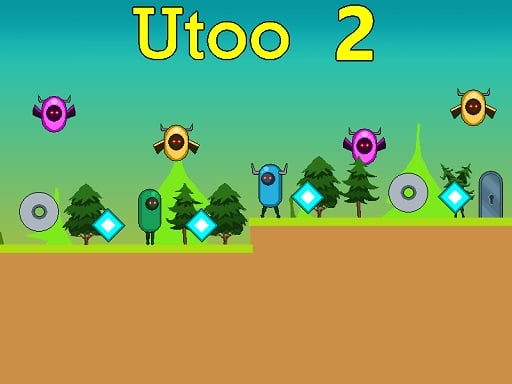
Utoo 2: The Ultimate 2‑D Arcade Platformer You Can’t Afford to Miss
“Collect blue cubes, dodge flying creatures, and prove you’re the pixel‑perfect hero.”
If you’ve ever dreamed of a retro‑style platformer that keeps you on the edge of your seat, Utoo 2 is the game that delivers. This next‑generation sequel to the beloved original Utoo series ramps the challenge up with eight tightly‑wrought levels, an arsenal of enemies, and a fresh twist on the classic jump‑and‑run formula.
Below, we dive deep into every aspect of Utoo 2 – from its engaging gameplay mechanics to the crisp HTML5 technology that keeps it running flawlessly in any browser. By the time you reach the end, you’ll understand why you should grab a control scheme, grab a pixelated cup of coffee, and start conquering those blue cubes before the spikes pop in.
1. Introduction – Why Utoo 2 Is a Must‑Play
Picture a side‑scrolling 2‑D world lit with vibrant pixel art, a catchy chiptune soundtrack, and a simple yet addictive core: collect blue cubes, avoid hazards, and hit the exit door to progress. That is the essence of Utoo 2.
What sets this sequel apart?
| Feature | What It Means for You |
|---|---|
| Pixel‑perfect Graphics | Immersion in a colorful, lovingly crafted environment |
| Arcade‑style Design | Quick‑play sessions that keep the finger flow |
| Progressive Difficulty | A gradual learning curve that rewards mastery |
| Double‑Jump Mechanic | Adds depth to timing and platforming choices |
| 8 Fully‑Designed Levels | Enough content for seasoned players and newcomers alike |
Whether you’re a nostalgic gamer craving that retro feel or a platformer aficionado testing your reflexes, Utoo 2 delivers both familiarity and fresh challenges.
2. Detailed Gameplay Description
2.1 Core Loop
- Collect Cubes: Every level is studded with shiny blue cubes—your primary objective—to fill your inventory or unlock secrets.
- Avoid Hazards: The map is peppered with flying enemies, rotating saws, deadly spikes, and more.
- Reach the Exit Door: At the end of each level, a bright orange door beckons. Hit it to unlock the next chapter.
2.2 Controls at a Glance
- Movement:
WASDor theArrowkeys handle lateral movement and vertical jumps. - Jumping:
- Single Jump: Press
WorUp Arrowonce. - Double Jump: Press the same keys
twice. Timing this maneuver is key for bypassing obstacles that block single‑jump paths.
- Single Jump: Press
- Platform Precision: Press and hold to glide gently over narrow gaps, especially when crouched against the floor tiles.
2.3 Levels – From Grassland to Mechanical Caves
Utoo 2’s eight levels follow an increasingly intricate design:
- Springboard Plains – Simple platforms with occasional spikes. Ideal for first‑time practice.
- Hover Hive – Birds patrol overhead; timing your jumps is critical to avoid being crushed.
- Saw‑Slam Suburbs – Rotating saws in fixed positions; pattern recognition is your friend.
- Spiky Spiral – A maze of spikes that forces you to plan routes ahead of time.
- Time‑Twist Tunnels – Speed‑boost zones add a layer of urgency; the double jump becomes essential.
- Gravity-Girders – Upward moving platforms and drop‑holes test your precision.
- Mechanical Mayhem – Gears and conveyor belts require swift reflexes.
- Final Frontier – A culmination of all previous mechanics, leaving no room for error.
Each level is meticulously balanced; the earlier stages acquaint you with hazards, while later ones layer them to increase tension.
2.4 2‑D Retro Aesthetic and Presentation
- Resolution: 800 × 640 pixels, ideal for both classic monitors and modern displays.
- Pixel Art: Every sprite, background, and effect is crafted with the same care as classic arcade hits, evoking strong nostalgia.
- Audio: A tight chiptune rhythm underscores the gameplay, adapting to player actions with high‑quality sound effects.
3. Key Features & Benefits
| Feature | Description | Benefit to Players |
|---|---|---|
| Double‑Jump Mechanic | Jump, press W or Up again to reach loftier platforms. |
Enables more advanced level design and skill display. |
| Enemy Variety | Flying creatures, saws, spikes, and platform‑moving monsters. | Keeps gameplay dynamic and encourages situational awareness. |
| Level Progression | 8 varied levels with escalating difficulty. | Provides a satisfying learning curve and replay value. |
| Pixel‑Perfect Audio | Distinct soundtracks for each theme. | Increases immersion and emotional response. |
| HTML5 Web‑Ready | No download required; run directly in browsers. | Eliminates friction and broadens accessibility. |
| Optimized Resolution | 800 × 640 with crisp visuals. | Supports classic look while maintaining clarity. |
| Simple Control Scheme | WASD/Arrow + double jump. | Low barrier to entry; high reflex engagement. |
| Collectible Rewards | Blue cubes unlock power‑ups or secret pathways. | Adds depth for completionists. |
| Replay Bonus | Hidden collectibles and time trials. | Increases replay value for mastery hunting. |
These features blend to create an experience that feels both fresh and familiar, appealing to longtime arcade fans and new players alike.
4. Tips & Strategies
4.1 Master the Double Jump
- Precise Timing: The double jump is not instantaneous. Aim to hit the jump button 150 ms after the apex of the first jump to lock in the second.
- Use It for Obstacles: Reach higher platforms, pass by low‑flying enemies, or execute a ‘flying off a ledge’ when a saw is passing.
4.2 Learn Enemy Patterns
- Flying Creatures: Hover in a 5‑second loop. Jump after their wings spread to clear them.
- Saws: Notice rotation direction and the time taken to complete a 360°. Jump two frames after the saw begins turning to avoid contact.
- Spikes: Often triggered by pressure plates. Time jumps as plates activate to avoid damage.
4.3 Map Your Levels
- Mark Platforms: In early levels, identify platforms that allow you to skip segments by double‑jumping.
- Use the Mini‑Map: The on‑screen HUD will show you pending hazards. Plan your route in advance.
4.4 Optimize Cube Collection
- Prioritize Low‑Risk Cubes: Gather cubes that are safe to pluck first; avoid venturing into dangerous zones unnecessarily.
- Back‑Up Routes: If you miss a cube, consider a back‑track once you’ve cleared the immediate hazard.
- Cube Bonuses: Some cubes hide small power‑ups (speed, temporary invincibility). Keep an eye out for them.
4.5 Practice with Time Trials
- After completing a level, enter the time‑trial mode to practice a faster route. This forces you to fine‑tune your jumps and enemy avoidance, resulting in a smoother overall run.
4.6 Leverage Platforming Crouch
- Lower the sprite’s collision box for a tiny margin when crouching against floor tiles. This helps you sidestep small spikes without leaving your platform.
5. Technical Information About HTML5 Gaming
5.1 Performance & Compatibility
- Canvas Rendering: Utoo 2 leverages HTML5’s
<canvas>element for real‑time drawing of sprites, tiles, and particle effects. - WebGL Option: For browsers supporting WebGL, a lightweight shader pipeline enhances performance on high‑end devices.
- Responsive Scaling: Even though the game officially uses 800×640, it scales elegantly to larger screens while maintaining pixel fidelity via CSS transforms.
5.2 Why HTML5 Matters
- Quick Play: Players can start immediately without downloading a patch or installing additional plugins.
- Cross‑Platform: Whether it’s a desktop, tablet, or mobile browser, every user can access the same experience.
- Updates & Corrections: Patches are rolled out seamlessly by updating the hosted JavaScript/asset files.
5.3 Asset Loading & Optimization
- Lazy Loading: Only assets needed for the current level are loaded initially, reducing bandwidth. Subsequent levels fetch new sprites as needed.
- Sprite Sheets: Consolidating many small images into single atlases dramatically cuts draw calls.
- Compressed Audio: Audio files are in OGG/MP3, with fallback for different device codecs.
5.4 Security & Play
- Content Security Policy (CSP): The game domain restricts script execution to trusted origins, preventing cross‑site scripting attacks.
- Game Loop: A
requestAnimationFrame‑based loop ensures optimal frame rates, typically 60 FPS on modern devices.
6. Why Players Should Try Utoo 2
| Reason | Why It Matters |
|---|---|
| Nostalgic Yet Fresh | Combines retro pixel charm with new gameplay mechanics, appealing to old fans and newcomers alike. |
| Sharpen Reflexes | The double jump and hazard variety force precision timing, perfect for training reaction speed. |
| Cognitive Demand | Requires pattern recognition and strategic decision‑making, making it brain‑stimulating. |
| Short Play Sessions | Each level can be completed in 5–10 minutes, fitting into busy schedules. |
| Collecting Pleasure | Blue cubes and hidden secrets create a satisfying “completionism” loop. |
| Accessible Platform | HTML5 means no downloads or system requirements—just open a browser and start playing. |
| Community | Friendly competition: share your best times, compare strategies with friends. |
| Pure Fun | It’s an outright joy: simple, engaging, and ridiculously fun to master. |
In short, Utoo 2 offers an unbeatable blend of challenge, nostalgia, and accessibility that’s rare in today’s gaming ecosystem.
7. Conclusion – Grab Your Keyboard, Jump In!
All things considered, Utoo 2 stands out as a shining example of the best modern 2‑D arcade platformers. Its crisp pixel art, engaging double‑jump mechanics, and meticulously designed level progression provide a rewarding experience for both casual gamers and hardcore platformer enthusiasts.
If you’re looking for a short, yet impactful gaming session that will test your hand‑eye coordination, strategic thinking, and reflex speed—Utoo 2 is the game to play. Let the retro soundtrack lift you, the blue cubes beckon, and the exit door await your arrival.
Ready to become the ultimate cube‑collecting hero?
Press W or the Up Arrow twice, feel the rush of double‑jumping, and let’s see how far you can go through the eight challenging worlds of Utoo 2.
Jump into adventure now and show the world your platforming prowess!