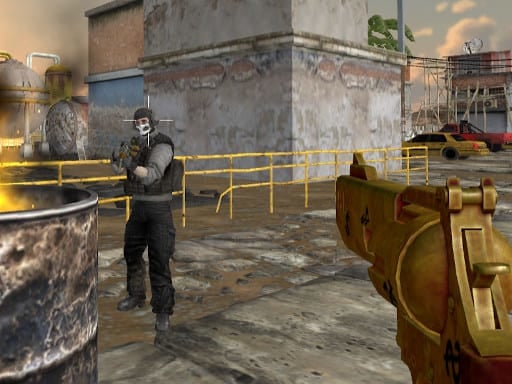
ForceZ.io
Dominate the Arena – The Most Thrilling 3D Multiplayer Shooter of Today
If you’re a fan of fast‑paced action, immersive 3D graphics, and adrenaline‑driven multiplayer mayhem, ForceZ.io is the game you’re looking for. Released for the web, this shooter brings the excitement of high‑octane gunfights straight into your browser – no downloads, no installations, just pure, unfiltered gaming fun. Built on Unity3D and powered by WebGL, ForceZ.io lets you jump straight into the fray with all the features that make an io‑game a must‑try: lightning‑fast progression, instant matchmaking, and the ability to go from a solo legend to a co‑op champion in seconds.
Why read on?
In this guide we’ll explore every corner of ForceZ.io – from core gameplay mechanics and weapon variety to tactical tips, technical insights, and why it deserves a spot in your game‑library. Whether you’re a casual browser gamer or a dedicated shooter enthusiast, this article will give you the roadmap to becoming a ForceZ.io elite.
1. Game Overview & Introduction
ForceZ.io is a multiplayer, action shooter that packs 3D gameplay into a clean, responsive WebGL environment. At first glance, the title may look like another run‑and‑gun, but the depth behind its 5 distinct arenas, over ten weapon types, and adjustable room settings sets it apart from ordinary io shooters.
What Makes ForceZ.io Stand Out?
- Instant Accessibility – Play with a single mouse click. No friction, no wait.
- Dynamic Environments – 5 meticulously designed maps that offer varying tactical options.
- Room Customization – Double‑speed arenas, double‑jump, or double‑HP settings for adrenaline‑crushing races.
- Rich Arsenal – 10+ weapons ranging from classic rifles to explosive launchers.
- Progression System – Upgrade your loadout and armor to stay ahead of the competition.
With these features, ForceZ.io delivers action, shoot, and multiplayer action right inside your browser, satisfying fans of 3D games who love to test their reflexes against global opponents.
2. Detailed Gameplay Description
Controls – Master the Simple to Start With
- WASD / Arrow Keys – Move the character
- Left Click – Fire the selected weapon
- Right Click – Aim with precision (for sniper, rifle, or scope‑based weapons)
- R – Reload your current gun
- Number Keys (1‑3, 9) or Mouse Wheel – Cycle through the arsenal
- Space – Jump (essential on double‑jump rooms)
- Tab – Toggle pause menu or view stats
The control scheme is deliberately simple, making it easy for new players to grasp while giving veteran players a smooth, responsive feel.
Core Loop – The Pulse of the Game
- Pick a Room – Choose from a single‑player mode or head into a match against other online players.
- Select a Map – Each of the 5 arenas has its own flavor: from open battlefields to tight corridors.
- Choose Your Loadout – Upgrade weapons in the armor shop or select defaults.
- Engage – Shoot, run, dodge, and rack up kills.
- Earn Rewards – Points and virtual currency unlock more powerful gear.
- Repeat – Jump back into another round, climbing the leaderboard each time.
Every round is a self‑contained sprint of action that can be played in quick sessions or as a marathon of continuous gameplay. The real power comes when you combine weapon mastery with map knowledge.
3. Key Features & Benefits
| Feature | What It Gives You | Why It Matters |
|---|---|---|
| 5 Immersive Maps | Unique layouts, objectives, and choke points | Keeps gameplay fresh; each map demands different tactics |
| Single & Multiplayer Modes | Versatile play – solo drills or PvP showdowns | Adapt to your mood; hone skills solo or test them live |
| Double Speed / Double Jump / Double HP Options | Adjustable difficulty and playstyle | Customize your experience – make matches faster or tougher |
| 10+ Weapons | Assorted guns: assault, sniper, rocket, shotgun | Variety forces you to master multiple play styles |
| Armor Shop | Buy upgrades, skins, and buffs | Personalization + progression keeps long‑term engagement |
| HTML5 WebGL Engine | Smooth 3D visuals in the browser | No need for dedicated hardware or installations |
| Cross‑Platform | Play on Windows, macOS, Linux, or even mobile browsers | Seamless across devices, perfect for spontaneous gaming |
| Real‑Time Multiplayer | Low‑latency matches against global players | Intense, competitive atmosphere |
Practical Benefits
- Accessibility – Just a web browser, no downloads.
- Community – Live matches create a global player base and a chance to discover your own play rhythm.
- Progression – Unlock new gear and upgrade your play through in‑game rewards, encouraging replayability.
- Learning Curve – Simple controls reduce friction, but mastering maps and weapons offers depth.
4. Tips & Strategies
Below are actionable insights that will help you climb the leaderboard. Whether you’re a new player or a seasoned veteran, these tips can shave seconds off your aim and give you an edge over opponents.
4.1 Map Mastery
- Know the Focal Points – On each map, identify natural cover (walls, crates, or corners) and high‑traffic zones.
- Utilize the Arena Layout – For faster maps, focus on speed lanes; for intricate maps, prioritize sniper positions.
- Use Terrain for Concealment – In double‑jump rooms, use elevation to surprise enemies.
4.2 Weapon Selection
- Balancing Firepower – Combine a high‑damage rifle with a long‑range shotgun or sniping rifle.
- Switching Keys – Familiarize yourself with the number keys; in the heat of battle, a quick shift can be decisive.
- Reload Timing – R for reload; plan your reload during a lull to avoid being caught in the middle of a firefight.
4.3 Tactical Movement
- Utilize Double Speed – In speed rooms, sprint to outpace opponents and reposition quickly.
- Use Jumping smartly – Jump only when necessary; overusing the space bar can create an easy target.
- Crouch Low – Reduces your profile and makes you harder to hit.
4.4 Defensive Play
- Positioning – Keep your back to walls or corners; a full 360-degree view is rarely possible.
- Use Armor Wisely – Upgrade your armor early to offset the risk of high‑killing rounds.
- Cooldown Management – If your armor offers cooldowns or buffs, trigger them strategically (e.g., before a round start).
4.5 Team Play & Communication
- Call Out Positions – Even in purely PvP, knowing teammates’ locations can help anticipate crossfire.
- Coordinate Attacks – A synchronized push can overwhelm a single opponent.
- Support with Ammo Drops – If the game offers drops, share or pick them strategically.
4.6 Progression & Economy
- Earn Currency – Each kill, assist, and match win accumulates points; spend them early on essential weapons.
- Shop Timing – Some upgrades lock in your entire match; consider waiting until you’re ready in the middle of a game.
- Skin Incentives – While skins are cosmetic, the shop often offers bundles. Take advantage of promotions.
5. Technical Information About HTML5 Gaming
5.1 The Power of WebGL
ForceZ.io uses WebGL, which allows for hardware‑accelerated 3D rendering directly in the browser. This means:
- High‑performance graphics comparable to desktop games.
- Reduced load times – minimal assets download; the game streamlines what’s necessary.
- Cross‑platform consistency – Whether you’re on Chrome or Firefox, your experience remains uniform.
5.2 Unity3D Engine Integration
- Built in Unity – Offers robust physics, animation, and audio systems.
- Optimized for Low Bandwidth – Unity’s Asset Bundles ensure efficient data transfer.
- Continuous Updates – Unity’s ecosystem supports frequent patches and expansions.
5.3 Multiplayer Infrastructure
- Real‑Time Server Architecture – Uses WebSockets and TCP/UDP to keep latency low.
- Matchmaking Algorithm – Balances skill levels by matching similar‑ranked players.
- Data Compression – Minimizes bandwidth usage, ensuring smooth gameplay even on 2G/3G.
5.4 Browser Compatibility
- Supported Browsers: Chrome, Edge, Firefox, Safari, and modern mobile browsers.
- Minimum Requirements: Any device with WebGL support; no special plugins are required.
- Resolution: 1060x650 – Designed to render comfortably on standard laptops/PCs and mobile screens.
5.5 Mobile Optimization
- The controls adapt for touch – tapping the gun moves, swiping for aiming, and on-screen buttons for reload.
- Performance scales down gracefully to avoid overheating on low-power devices.
6. Why Players Should Try ForceZ.io
| Reason | Why It Appeals |
|---|---|
| Immediate Gratification | Hit a match in seconds; no waiting time. |
| Dynamic Gameplay | Constantly changing arenas and weapon loadouts keep each round fresh. |
| Community & Global Competition | Real players worldwide; leaderboard pushes you to improve. |
| Skill‑Building | Combines reflexes, strategy, and teamwork. |
| Free-to-Play | No hidden costs – all in-game currency comes from play. |
| Cross‑Device Play | Seamless transition from desktop to mobile. |
| Continuous Updates | New maps, weapons, and modes keep the game evolving. |
For gamers craving quick, intense shooting action, ForceZ.io offers the perfect blend of accessibility and depth. Whether you’re looking for a late‑night quick match or a deeper progression experience, this title has it all.
7. Conclusion & Call‑to‑Action
ForceZ.io is more than another online shooter; it’s a testament to what modern web technology can deliver. With its polished Unity3D framework, lightning‑fast WebGL engine, and engaging multiplayer experience, you’re guaranteed hours of heart‑pounding action.
- Why wait? Dive into the arenas, sharpen your aim, and climb the leaderboards.
- Bring your friends – team up for strategic domination.
- Customize – unlock and upgrade your weapons in the armor shop.
- Experience – Play across devices, from the office to the gym.
Set your sights on victory. Grab your mouse, hit play, and join the force that’s breaking the io game world today. Your next epic battle is just a click away—and the leaderboard is waiting for a new legend you to rise.