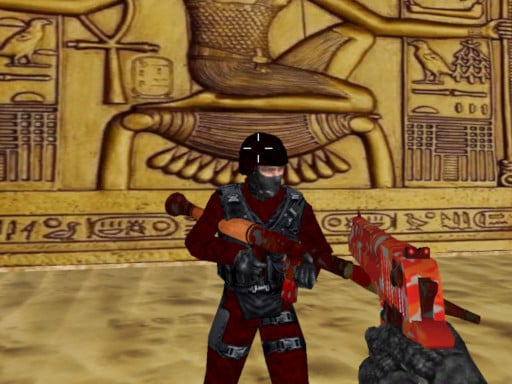
ShooterZ.io – The Ultimate 3D Multiplayer Shooter for WebGL Enthusiasts
Introduction
Have you ever wanted a fast‑paced, 3‑D multiplayer shooter that works straight from your browser? Imagine dropping into a war‑torn arena, picking your favorite weapon, and blasting opponents while your friends are 30 miles away. ShooterZ.io delivers that experience and then some. Built on WebGL and Unity3D, this action‑packed io‑game offers slick graphics, intuitive controls, and endless fun in a single 960×600 resolution arena.
If you’re a gamer looking for an adrenaline‑filled 3‑D game that can be played with friends or strangers, this article explains everything you need to know about ShooterZ.io—gameplay, features, tech, and strategies—so you can jump right in and dominate the battlefield.
1. Detailed Gameplay Description
| Element | What It Means | How It Works |
|---|---|---|
| Controls | Left mouse = fire Right mouse = aim R = reload C = crouch P = pause 1-9 = select weapon T = open chat |
All actions are responsive with zero lag. Mouse button combos let you shoot while aiming, creating a fluid “shoot‑n‑aim” style. |
| Game Modes | Custom lobby creation or public match | Create a room with your friends or join a random arena. In both, 40 players compete to remain the last avatar alive. |
| Weapons | 9 categories ranging from pistols to sniper rifles | Pick your loadout based on playstyle: quick‑hit melee, high‑damage rifles, or long‑range sniping. |
| Environment | Multiple arenas (desert, urban, forest) | Each environment offers unique cover, terrain, and strategic spots. |
| Health & Respawn | Live bar, respawn after death | Respawn delay varies by rank and difficulty. Use time wisely to regroup with teammates. |
| Chat & Sound | In‑game text chat, background music | Stay in touch with “T” for text chat. Background music ramps up adrenaline. |
Starting a Game
- Launch the Browser: Open your favorite Chromium‑based browser (Chrome, Edge, Brave).
- Hit “Play”: The main menu will load, showing a “Create Lobby” or “Join Lobby” button.
- Invite Friends: If you choose “Create Lobby”, a unique link or code appears; share it so your friends can hop in instantly.
- Select Environment: Pick from desert, city, or forest. Lighter graphics mean faster load times.
- Choose Weapon: Press keys 1‑9 to toggle weapons; the default is a semi‑automatic rifle.
- Start Fighting: Once everyone’s in, the match begins. Use mouse controls to shoot, crouch, and sneak around.
In‑Depth Mechanics
- Reloading: Press R to reload. If you hold R while firing repeatedly, an instant reload animation will play once clip is empty.
- Crouch: C lowers your hitbox. Perfect for blending into shadows and remaining unseen.
- Pause: P brings up the pause menu, with options for “Resume,” “Settings,” and “Exit.” Pausing stops the timer for all players, preventing unfair advantage.
- Chat: Use T for text messages with an instant enter to send. No emojis—just crisp text.
- Health Management: Keep an eye on your health bar. A full bar gives you better shot accuracy and faster reload speeds.
- Victory: When your health reaches 0 you respawn after a time. The last player alive or the team with most kills wins.
2. Key Features and Benefits
| Feature | Benefit | Why It Matters for Players |
|---|---|---|
| High‑Quality 3‑D Graphics | Immersive visual experience | Makes each strike feel more real. |
| Smooth Multiplayer | Low latency, stable matches | Allows seamless teamwork and competitive play. |
| Multiple Environments | Strategic variety | Every map demands a different tactic, preventing gameplay repetition. |
| Wide Weapon Arsenal | Customization & variety | Experiment with different weapons to suit your style—ranged sniper or close‑quarters gunplay. |
| Cross‑Platform WebGL | Play anywhere | No downloads, instant play on Windows, macOS, Linux, or mobile (desktop mode). |
| Simple Controls | Quick learning curve | Mouse‑centric controls are universally understood, even for casual players. |
| Real‑Time Chat | Team coordination | Communicate strategies instantly during tense battles. |
| Balanced Difficulty | Inclusive | Newbies can learn while veterans polish skills. |
| Fast Loading Times | Minimal waiting | Enjoy hours of gameplay. |
| Responsive UI | Easy navigation | Settings, maps, and weapon lists are intuitive. |
These strengths make ShooterZ.io a standout in the crowded io‑gaming market, particularly for fans of action and multiplayer titles looking for an online shoot‑and‑run experience.
3. Tips & Strategies
| Category | Tip | How to Apply |
|---|---|---|
| Weapon Choice | Pick the right gun for each arena | Desert needs a long‑range rifle; forest suits melee or shotguns. |
| Aim & Fire | Aim low in crowded spaces | Reduces the chance of missing because your crosshair is too high. |
| Movement | Use crouch when near enemies | Reduces detection radius and slows down enemies’ sight. |
| Map Knowledge | Memorize exits and cover points | Gives you escape routes after getting shot. |
| Teamwork | Communicate “flank” and “raid” calls | Use T quickly to direct teammates. |
| Reload Timing | Reload only when out of ammo | Do not waste reload in the middle of an encounter. |
| Crouch & Sneak | Walk quietly under enemy line of sight | Move slowly to reduce audio detection. |
| Kill Switch | Aim for headshots on snipers | High damage per hit, more effective kills. |
| Resource Management | Save ammo when low on health | Prioritize survival, then return to the front lines. |
| Environment Exploitation | Use terrain elevation | Shooting from higher ground gives a positional advantage. |
Advanced Tactics for Veterans
- Suppressing Fire: Constantly shoot at enemy headshots to keep them on the defensive, then reposition.
- Shot‑gun Positioning: Use a shotgun in close‑quarters; move rapidly to reduce the chance of counter‑shots.
- Dual‑Weapon Strategy: Keep a primary rifle and a secondary sniper. Switch between them based on distance.
4. Technical Information – HTML5 Gaming & WebGL
Why ShooterZ.io Uses WebGL
- Platform Agnostic: Works on any browser that supports WebGL 2.0, without plugins.
- GPU Acceleration: Leverages the device’s graphics card for smooth 3‑D rendering.
- Reduced Resource Footprint: Less CPU usage compared to traditional desktop titles.
Built on Unity3D – A Game‑Making Powerhouse
- Rapid Development Cycle: Unity’s engine includes a vast library of pre‑made assets.
- Consistent Physics Engine: Accurate collision detection and gravity simulation.
- Cross‑Platform Export: One codebase, multiple platforms (web, Windows, macOS).
Performance Optimizations
- Resolution 960×600: Keeps frame rates stable, especially on mobile devices.
- Dynamic Loading: Textures and assets are streamed as needed to reduce memory usage.
- Compression Algorithms: Reduces texture file sizes, speeding up initial load time.
Security & Fair Play
- Client‑Server Validation: Game logic runs on a secure server; player actions are verified to prevent cheating.
- Encrypted WebSocket Communication: Protects gameplay data against eavesdropping.
5. Why Players Should Try ShooterZ.io
| Reason | Explanation |
|---|---|
| Free & Instant | No downloads or expensive license. Just open a URL. |
| Community‑Driven | Thousands of active players worldwide; large chat community. |
| Competitive & Casual Modes | Suited for both hardcore multiplayer tournaments and quick matches after work. |
| No Installation Hassle | Skip the game‑store download and start shooting immediately. |
| Continuous Updates | New weapons, maps, and seasonal events keep the experience fresh. |
| Low System Requirements | Runs on most laptops and even mid‑range smartphones. |
| Balanced Gameplay | No pay‑to‑win mechanics—skill wins, not spending. |
| Engaging Storyline | The game’s lore and factions encourage players to build long‑term relationships. |
In short, ShooterZ.io delivers a compact yet powerful action experience for anyone who loves multiplayer 3‑D shooters—without the usual hurdles of installation and hardware demands.
6. Conclusion & Call‑to‑Action
ShooterZ.io has proven itself as one of the most immersive, action‑packed io‑games on the web. With slick 3D graphics, intuitive mouse‑based controls, and a thriving multiplayer community, every match feels fresh and rewarding. Whether you’re a seasoned gamer looking for a quick adrenaline rush or a new player curious about web‑based shooters, ShooterZ.io meets all the criteria.
Ready to dominate the battlefield?
- Click “Play” now and jump straight into an exciting match.
- Invite friends to your private lobby and coordinate tactics in real time.
- Experiment with weapons, practice your aim, and become the last survivor.
Don’t wait— shoot, aim, reload, and take the glory in ShooterZ.io today! 🚀🕹️
Tags: 3d-games, action, 3d, webgl, multiplayer, sniper, io-games, gun, unity3d, io, weapons