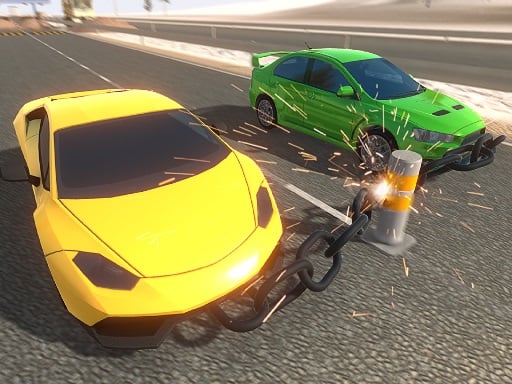
Drive Chained Car 3D – The Ultimate 3D Racing Experience That Rocks the Streets! 🚗💥
“The moment the chain snaps, the real adventure begins.”
— A fan of Drive Chained Car 3D
If you’re a racing fan who craves fresh, high‑octane excitement, don’t spend another minute scrolling. Drive Chained Car 3D is here to rewire your racing instincts. Think adrenaline‑fueled off‑road bus vs. Prado‑jeep battles, mind‑blowing ramps, and a chain‑breaking mechanic that turns every turn into a heart‑thrashing puzzle.
Let’s dive deep into this real‑time vehicle simulator that will push your driving skills, reaction time, and strategic thinking to the limit.
1️⃣ Why “Drive Chained Car 3D” Stands Out in the Racing Arena
- Genre‑blending: Combines pure racing, demolition derby, and chain‑breaking puzzles.
- Hyper‑realistic physics: Unity3D engines deliver fluid car dynamics, but the twist is the rapid beam drive that forces you to master both speed and control.
- Immersive graphics: 3D rendering powered by WebGL (when played in a browser) keeps every collision and drift breathtakingly detailed at 800x600 resolution.
- Dynamic track design: From jungle‑filled alleys to city rooftops, each race track is re‑engineered for an explosive experience.
2️⃣ Gameplay in Detail: More Than Just a Chase
2.1 Core Mechanics
At its core, Drive Chained Car 3D is a vehicle‑racing simulator that tests you on these pillars:
Chain Management
- Every car is bound by chains to rival vehicles.
- When the chain snaps, the game introduces the next level of difficulty: maintaining speed while avoiding collisions.
Rapid Beam Drive
- A unique power‑up that lets your car cut across the track with a “beam” effect.
- Perfect for sudden, sharp turns and rapid accelerations.
Ramp Mastery
- Land jumps with precision: use the ramp to gain extra speed, but beware of the crash‑simulator physics that can throw you airborne.
2.2 Controls
Use WASD to drive – a classic keyboard layout ensures you’re comfortable from day one.
W – forward
S – reverse
A – turn left
D – turn right
Space – activate the rapid beam drive (only when available)
2.3 Race Types
| Race Mode | Description | Key Challenge |
|---|---|---|
| Single‑Race | Classic head‑to‑head track. | Beat the AI and keep your chain intact. |
| Time Attack | Race against the clock across multiple tracks. | Speed & precision combine to beat the time log. |
| Chain Breaker | Compete to snap chains the fastest. | A battle of wits and reflexes against opponents. |
| Chaos Mode | Random obstacles, power‑ups, and track changes. | Adapt on the fly or else the chain snaps! |
3️⃣ Key Features & Benefits
| Feature | Benefit | Relevance to Gamers |
|---|---|---|
| Realistic 3D Physics (Unity3D) | Immersive feel; accurate vehicle dynamics | Great for enthusiasts who love genuine racing experience |
| Chain‑Breaking Mechanics | Adds a puzzle layer; forces strategic thinking | Keeps gameplay fresh and unpredictable |
| Rapid Beam Drive | Explosive acceleration; creative maneuvers | Enhances adrenaline rush and dynamic play |
| Ramp & Jump System | High‑impact stunts; stylish visuals | Offers visual spectacle and a new way to tackle tracks |
| WebGL Compatibility | Browser-based play; accessible without downloads | Allows instant play on PC, Mac, or mobile browsers |
| High‑Resolution Graphics (800x600) | Clear visuals even on older hardware | Balanced performance without sacrificing quality |
| Multiple Tracks | Variety; no repetitive loops | Encourages replayability and skill improvement |
| Cross‑Platform Friendly | Play anywhere with the same controls | Universal appeal to all racing fans |
4️⃣ Pro Tips & Strategies: Dominate the Chains
4.1 Mastering the Chain Mechanics
- Plan Your Path – Look at the track before the race. Identify where chains are likely to snap.
- Conserve Momentum – Use the rapid beam drive wisely. Save it for tight corners or to escape a potential collision.
- Keep an Eye on the Opponent – Often, the chain will break when you’re on a collision course with an enemy. Use this to your advantage to cut in behind them.
4.2 Handling Ramps & Jumps
- Aim for the Center – Land smoothly to avoid losing traction.
- Pre‑Launch Braking – Apply a bit of braking before the jump to maintain control.
- Stall for Speed – If you’re on a high‑speed straightaway, use the ramp to push the envelope of speed.
4.3 Avoiding Collisions
- Line of Sight – Keep an eye on the opponent’s chain; anticipate where it will break.
- Use the Terrain – Walls, bumps, and side paths are useful to dodge sudden obstacles.
- Brake Smartly – A quick, timely brake can prevent a collision and keep your chain intact.
4.4 Timing the Rapid Beam Drive
- On Approaching Turns – This can shave off seconds while maintaining a lane.
- During Chain Breaks – When the chain’s about to snap, a beam drive can help you outpace the hazard.
- Power‑Ups as a Buffer – Position power‑ups on the track strategically; you might use them just before the chain breaks.
4.5 Multiplayer (If Available)
- Lead with Aggression – Intimidate opponents by staying ahead; break their chains first.
- Watch Their Chains – Keep an eye on each opponent’s chain length.
- Chain Team Strategies – Form temporary alliances to break a stronger opponent’s chain simultaneously.
5️⃣ Technical Deep‑Dive: HTML5, WebGL, and Unity3D
5.1 HTML5 Gaming Foundations
- HTML5 Canvas: The rendering surface for 2D/3D draws.
- WebGL Context: The GPU‑accelerated engine enabling 3D graphics.
- Performance: The game runs smoothly even on moderate hardware due to efficient shader usage and texture streaming.
5.2 Unity3D Engine & WebGL Export
Why Unity3D?
- Widely used for its cross‑platform capabilities.
- Built‑in physics engine allows realistic vehicle dynamics.
- Rich Asset Store for rapid development and polished aesthetics.
WebGL Build:
- The Unity project is exported to WebGL.
- Players can launch the game directly in browsers like Chrome, Firefox, Edge, and Safari.
Asset Optimization:
- Compressed Textures to lower file size.
- Level‑of‑detail (LOD) models reduce polygon count on distant cars.
5.3 Compatibility & Performance
Minimum Requirements:
- A modern browser (latest Chrome or Firefox).
- 800×600 display resolution is the default; can be scaled up without loss of quality.
Memory Footprint:
- The entire game weighs under 200 MB when zipped.
- Efficient memory usage ensures quick startup times, typically under 5 seconds on an average laptop.
5.4 Input Handling
- Keyboard Events: JavaScript event listeners capture WASD and Space.
- Responsive Controls: A 60 FPS update loop ensures smooth physics calculations.
6️⃣ Why You Should Strap in and Race
- Innovation in Racing – The chain‑breaking mechanic is a fresh twist that pushes the genre beyond pure speed.
- Accessibility – Play immediately in your browser—no hefty downloads, instant thrill.
- Sharpen Your Skills – Balance acceleration, chain management, and collision avoidance across diverse tracks.
- Replay Value – Endless combinations of track obstacles, chain dynamics, and racing modes keep the adrenaline pumping.
- Community Appeal – The competitive vibe, coupled with simple controls, invites both casual gamers and seasoned racers to join the action.
7️⃣ Final Takeaway & Call‑to‑Action
Drive Chained Car 3D is not just another racing simulator; it’s a chain‑breaking odyssey that demands quick reflexes, strategic foresight, and pure love for cars. With its hyper‑realistic physics, immersive 3D world, and the relentless pace of real‑time racing, you’ll find it hard to look away.
🚀 Dive In Now!
- Open your favorite browser → 800×600 is the sweet spot.
- Get ready to chain the competition with your WASD keys.
- Experience the rush of rapid beams, dangerous ramps, and the heart‑stopping moment when the chains break.
Don’t just watch the race—drive it, dominate it, break it. Grab your keyboard, get behind the wheel, and let the chain‑breaking adventure begin.
Happy racing! 🎮🥇