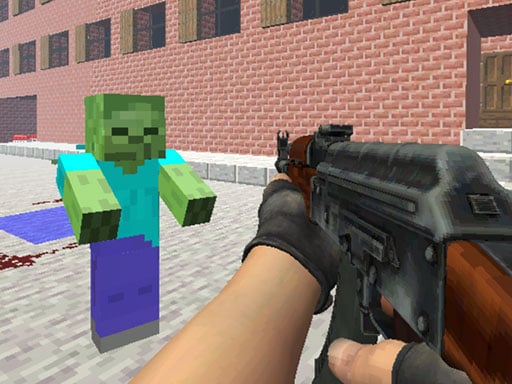
Counter Craft 2 Zombies – The Ultimate Minecraft‑Inspired 3D Shooter to Test Your Survival Instincts
Turn the blocky world of Minecraft into a deadly arena of undead, armed with a pistol in one hand, a shotgun in the other and a powerful bolt‑gun in the third. It’s an intense shoot‑em‑up experience that combines the raw freedom of 3D gaming with the thrill of survival horror. Ready to become a fearless zombie slayer?
1️⃣ Introduction
Counter Craft 2 Zombies takes the beloved sandbox vibe of Minecraft and injects it with high‑octane shooting action that’s perfect for fans of shoot‑em‑up and shooter genres. Built on Unity3D and powered by WebGL, you’ll battle waves of the undead in a fast‑paced, single‑player campaign that feels as fresh as a new Minecraft biome.
Whether you’re a seasoned veteran of classic first‑person shooters like Counter‑Strike: Global Offensive (CS:GO) or a newcomer eager to test your reflexes in a 3D environment, this game offers an immersive, adrenaline‑filled experience that keeps you on the edge of your seat.
2️⃣ Gameplay Overview
2.1 The Core Loop
- Your Goal: Survive through successive rounds of relentless zombie hordes. Each round gets progressively harder, with more zombies, faster spawn rates, and smarter AI.
- Weapons You’ll Choose From:
- Standard Pistol – Quick, reliable, and perfect for low‑health enemies.
- Shotgun – Devastating close‑quarter damage; wipes out groups of zombies at your feet.
- Bolt‑gun – High‑damage long‑range firepower for taking out tough undead from a distance.
Feel the thrill as you switch weapons on the fly, reloading with the R key, pulling off a bullet time slow‑motion with T to line up shots, and jumping through strategic melee gaps with Space.
2.2 Controls at a Glance
| Key | Action |
|---|---|
| WASD | Move around the play area |
| LMB | Shoot the current weapon |
| RMB | Aim & lock on a target |
| Mouse Wheel | Cycle through the three weapons |
| R | Reload |
| Space | Jump |
| T | Activate bullet time (slow‑motion) |
| Other | Interact with cover and environment |
2.3 Visuals and Sound
- Resolution: 960x600 (ideal for web browsers, but you can scale up on larger screens).
- Graphics Engine: Unity3D delivers crisp blocky textures reminiscent of Minecraft, while WebGL keeps rendering smooth in any browser.
- Audio: Dynamic gunfire, bone‑cracking zombies, and atmospheric ambient sounds punctuate gameplay, amplifying tension with every pop.
3️⃣ Key Features & Benefits
| Feature | Why It Matters | Practical Benefit |
|---|---|---|
| 3D Blocky World | Familiar Minecraft aesthetics | Keeps gameplay relatable and visually appealing |
| Multi‑Weapon System | Mix of pistol, shotgun, bolt‑gun | Strategic depth for different combat scenarios |
| Bullet‑Time Mechanic | Slow‑motion with T | Allows precise aiming in chaotic moments |
| Increasing Difficulty Rounds | Progressive challenge | Long‑term engagement and replayability |
| Controls in One Player | Designed for solo play | Ideal for practicing reflexes or quick sessions |
| WebGL Powered | Runs directly in any modern browser | Easy access, no downloads needed |
| Unity3D Engine | Robust physics & rendering | Smooth gameplay on various devices |
| Action‑Packed Zombie Shoot‑em‑up | Fast‑paced gameplay | Keeps adrenaline high throughout |
For shooting enthusiasts, Counter Craft 2 Zombies is a playground that blends shooters, zombie survival, and 3d-games into a single, addictive experience. The game’s emphasis on quick decision‑making and weapon versatility appeals to fans of intense action and precise gunplay, reminiscent of the skill challenges found in CS:GO.
4️⃣ Pro Tips & Killer Strategies
Master the Weapon Swap
- Keep the pistol ready for “in‑and‑out” bursts.
- Switch to the shotgun whenever a cluster of zombies appears—aim for the cluster to maximize headshots.
- Reserve the bolt‑gun for elite zombies or when you’re backed against a wall.
Use Bullet Time Wisely
- Activate T when several zombies converge or when you’re out of bullets.
- Combine bullet time with cover to dodge or set them up for a kill.
Positioning is Half‑the Battle
- Keep the right side of the screen open for “quick reload” using R.
- Exploit the 3D environment: duck behind blocks or jump to high platforms for better sightlines.
Reloading on the Fly
- Don’t wait for the clip to empty—reload mid‑combat to maintain firing rhythm.
- Reloading while moving creates a more realistic feel; practice the R + walk combo.
Aim for Headshots
- Headshots deal double damage against most zombies. Use the slow‑motion T to line them up when surrounded.
Keep Your Health
- If you’re low on health, find a safe spot, use T to slowly reload, and wait for zombies to pass.
- Avoid unnecessary fights; sometimes it’s better to retreat and survive.
Utilize Momentum
- Throw the shotgun for a “burst and dash” strategy: load, shoot, and immediately dash forward.
- This reduces the hit‑recoil risk and gives you time to pull back to a strategic spot.
Practice Makes Perfect
- The game’s learning curve is steep, but with regular play you’ll soon instinctively switch to the best weapon for any melee.
- Track your high score and aim to beat your previous run; the incremental challenge keeps the gameplay fresh.
5️⃣ Technical Deep Dive: HTML5 & WebGL Gaming
5.1 Why HTML5 Matters
HTML5 is the backbone of modern browser gaming. By leveraging WebGL within a Canvas element, Counter Craft 2 Zombies delivers:
- Cross‑Platform Compatibility – Play on Windows, macOS, Linux, iOS, and Android without installation.
- Instant Play – No need for native downloads or plugins; a single click, and you’re inside the game.
- Optimised Performance – Modern JavaScript engines, coupled with Unity’s WebGL exports, produce smooth frame rates even at a 960x600 resolution.
5.2 Unity3D to WebGL Pipeline
Unity3D’s export to WebGL converts C# scripts and shaders into WebAssembly (WASM) modules, ensuring performance close to native:
- Physics & Collision – Retains the familiar Unity3D physics for realistic zombie movement and bullet impact.
- Lighting & Shadows – Blocky, dynamic lighting mimics Minecraft’s style, providing immersive ambience.
- Memory Management – WASM’s efficient memory model allows the game to run on a wide range of devices.
5.3 Browser Performance Tips
- High‑End Browsers – Ensure you’re using the latest version of Chrome, Edge, Firefox, or Safari for the best WebGL acceleration.
- Enable GPU Acceleration – Check browser settings to confirm that hardware graphics acceleration is active.
- Close Unnecessary Tabs – Free up RAM and CPU cycles for smoother gameplay.
6️⃣ Why Everyone Should Try Counter Craft 2 Zombies
| Angle | Why It’s A Must‑Try |
|---|---|
| Accessibility | Free, web‑based, instant play |
| Genre‑Melding | Combines shoot‑em‑up + zombie survival + Minecraft‑style 3D |
| Skill Development | Sharpens hand‑eye coordination, quick decision‑making |
| Replayability | Endless rounds with progressively tougher zombies |
| Community Appeal | Shares tags like csgo, unity3d, shoot, 3d-games—great for fan communities to discuss tactics |
| Educational Value | Demonstrates how WebGL can produce complex, interactive games online |
Beyond the pure thrill, the game acts as a micro‑lesson in how traditional game aesthetics can be adapted to the web. If you enjoy fast‑paced shooters, want a fresh challenge, or simply want to enjoy a lighthearted zombie rush in a Minecraft‑like environment, Counter Craft 2 Zombies delivers on all fronts.
7️⃣ Conclusion and Call‑to‑Action
So, whether you’re a twitch‑trigger‑jacked shooter veteran or a casual gamer craving an extra rush of zombie‑fighting fun, Counter Craft 2 Zombies is your ticket to action‑packed, blocky excitement. Grab your favorite weapon, reload, and stare down the undead with bullet‑time at your fingertips.
Ready to test those reflexes?
- Hit play now and survive as many rounds as you can.
- Master the weapon rotation and bullet‑time precision to climb the leaderboards.
- Share your best scores with friends—who can survive the most rounds?
Don’t let the zombies overrun you. Grab your gun, brace for bullet‑time, and become the ultimate Counter Craft 2 Zombies champion.
Happy shooting!