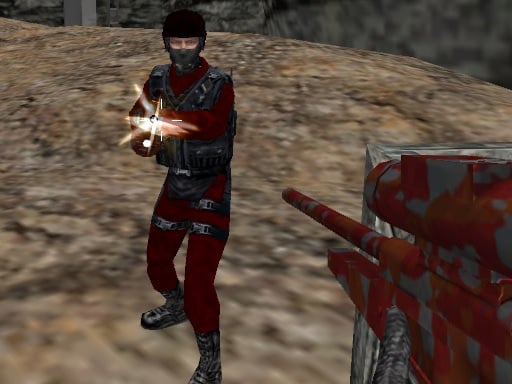
CS Online – Dive Into the Fast‑Paced, Browser‑Based 3D Shooter That’s Taking the World by Storm
Introduction
Picture yourself in the scorching dunes of a desert, the sun beating down on towering sand dunes, or you could be standing in a sun‑bleached ancient temple, surrounded by stone columns and hidden passageways. Maybe you’d rather be inside a gritty factory full of steel beams or a claustrophobic shipyard where container stacks become makeshift fortification. CS Online lets you choose where the action takes place – and it’s all yours to command.
This browser‑based shooting game uses cutting‑edge HTML5 WebGL technology to deliver crisp, 3‑dimensional, real‑time combat that is only a few keystrokes and clicks away. Whether you’re a casual gamer looking for a quick adrenaline rush or a competitive shooter honing your aim, CS Online offers a fast‑paced multiplayer experience that connects players worldwide in any language, any era, and any device with a 960 × 540 resolution or higher.
Why are millions of players tuning in to CS Online? The answer is clear: instant access, high‑quality graphics in the browser, and a satisfying arsenal of weapons that feel real enough to make every shot a win.
Detailed Gameplay Description
1. The Arenas – From Sand to Steel
| Arena | Environment Highlights | Combat Dynamics |
|---|---|---|
| Desert Outpost | Sandstorms, oil rigs, sand dunes | Long‑range sniping is golden; use elevation for cover. |
| Ancient Temple | Crumbling walls, narrow catacombs, mossy pillars | Tight corridors encourage close‑quarters tactics. |
| Factory | Conveyor belts, steel girders, industrial lighting | Utilize crates as high‑cover; movement is slower due to dust. |
| Container Ship | Interlinked steel containers, rusted machinery | Close‑in fighting with high ceilings; stealth is key. |
Every arena is meticulously crafted using Unity3D and exported as a WebGL experience. This means 3‑D depth, realistic lighting, and particle effects are all rendered directly in your browser’s canvas element.
2. Mission Modes
CS Online offers both competitive head‑to‑head and team‑based match types.
- Team Deathmatch – 5 vs. 5, objective is to secure kills while defending your squad.
- Capture the Flag – Each side holds a flag; bring it to the opponent’s base to win.
- Free for All – Everyone fights everyone, a true test of survival.
3. How to Play – Controls Cheat‑Sheet
- Left Mouse Button – Fire the active weapon.
- Right Mouse Button – Aim down sights (ADS).
- R – Reload.
- C – Crouch to reduce your silhouette and increase steadiness.
- P – Pause the game.
- 1–9 – Switch between available weapons.
- T – Open in‑game chat.
Tip: Keep your mouse steady when the right button is held; even a tiny tremor can turn a 9‑inch bullet into a miss.
Key Features and Benefits
| Feature | What It Means For You | Benefit |
|---|---|---|
| Fast‑Loading WebGL Engine | Instantly boot in any modern browser. | No downloads or installations—game ready in seconds. |
| Cross‑Platform Play | PC, Mac, even Chrome on mobile. | Play with friends regardless of device. |
| Dynamic Weapon Roster | From pistols to rifles to rocket launchers. | Choose a loadout that suits every play style. |
| Realistic Sound Design | 3‑D positional audio with Unity’s audio engine. | Heightened immersion; you can hear footsteps from 30 m away. |
| Low System Requirements | 960 × 540 resolution with basic CPU. | Even an older laptop can run at a smooth 60 fps. |
| Community‑Driven | Global servers, regular updates, seasonal events. | A continuously evolving battlefield and fresh tactics. |
| In‑Game Chat & Voice | Text and voice communication integrated. | Seamlessly coordinate tactics with teammates. |
| Customizable Skins | Modded skins for guns and players. | Personalise your avatar while staying competitive. |
Tips & Strategies for Dominating the Battlefield
Master the Art of Crouch‑and‑Shoot
When you crouch (C), your hitbox shrinks. Combine this with ADS and the bullet is more likely to hit the target without giving away your position.Utilise the 1‑9 Weapon Slot System Intelligently
Keep your most frequently used firearms in slots 1 to 3 for lightning‑fast changes. Save the specialty weapons for the 8 and 9 slots – they’re lifesavers when the situation demands.Leverage the Terrain
Sand dunes in the Desert Arena can be used to create invisible cover. In the Factory, the metal beams act as makeshift barriers. Play to the environment.Aim for the Head – But Don’t Over‑Aim
Headshots deal massive damage, but they require tighter aim. If you’re in a fast‑paced engagement, aim for the torso to reduce missed shots.Use Rocket Launchers Sparingly
Rockets are powerful but have long travel times and blast radius. Ideal for clearing grouped enemies or sabotaging objectives.Stay Mobile, Stay Alive
Use the strafing technique: while firing, slightly move left or right. This makes you a harder target while still maintaining accurate fire.Communicate—Tactics Over Bravado
Use the T key to chat frequently, relay enemy positions, and set up cross‑fires. The synergy of a well‑communicated team beats raw firepower.Practice Reload Timing
Failing to reload during a firefight can be fatal. Keep an eye on your ammo bar; instinctively press R when it drops below 30% to avoid being caught in a disadvantageous position.Map Knowledge Is Power
Memorize choke points, sniper spots, and high‑ground positions in each arena. Quick knowledge of map layout can save seconds in crucial firefights.Play Defensive When Needed
When behind, use environment for cover, keep an eye on your minimap, and use the crouch button to drop your profile.
Technical Information About HTML5 Gaming
Why HTML5 + WebGL?
- Performance: Modern browsers harness GPU acceleration via WebGL, delivering real‑time 3‑D graphics that rival native applications.
- Accessibility: No plugins or additional downloads – any device with a recent browser (Chrome, Firefox, Edge, Safari) will run the game.
- Security: Runs in a sandboxed environment, limiting potential malware exposure; updates happen over the cloud.
How Unity3D Works in WebGL
Unity’s WebGL build targets WebGL 2.0 on desktop browsers and WebGL 1.0 on older ones. The game’s binary is compiled into JavaScript, which is then executed inside the browser. Audio, physics, and animation are all preserved.
Resolution Details
CS Online defaults to a canvas resolution of 960 × 540 (16:9). It uses dynamic scaling to maintain aspect ratio on various screen sizes, ensuring that players experience the same visual fidelity regardless of device.
Browser Compatibility
- Supported: Chrome 61+, Firefox 57+, Edge 16+, Safari 12+.
- Unsupported: Internet Explorer 11 and below.
Why HTML5 Is the Future of Multiplayer Shooting
- Low Barrier to Entry: Gamers need only a web browser, no subscriptions or hardware upgrades.
- Instant Updates: Developers push patches directly to servers; players immediately benefit from balance changes without extra installs.
- Cross‑Device Play: A player on a laptop can join a server with a teammate on a phone, all sharing the same 3‑D universe.
Why Players Should Try CS Online
- Zero Install, One Click – All you need is a modern browser and you’re in the middle of a high‑intensity firefight.
- Real‑World Graphics, Ultra‑Low System Demands – Achieve a true 3‑D experience on virtually any device.
- Global Multiplayer Arenas – Beat opponents in real time from around the world.
- Evolving Weaponarium – New items, upgrades, and skins keep the gameplay fresh.
- Community Events – Seasonal tournaments and community challenges deliver rewards and bragging rights.
- Accessible Tactics – With simple controls and comprehensive in‑game tutorials, seasoned sharpshooters and newcomers can both thrive.
If you love the instant thrill of a sniping duel, the strategic nuance of team objectives, or the pure adrenaline of a fast‑paced deathmatch, CS Online is the place to be.
Conclusion – Ready, Aim, Play!
CS Online combines unforgettable 3‑d graphics, real‑time competitive multiplayer, and unbeatable accessibility into one seamless experience. Whether you’re a veteran shooter looking for the next challenge or a casual gamer wanting a quick shot at an adventure, the desert dunes, ancient temples, factories, and ship containers are waiting to be conquered.
So, what are you waiting for? Put on your headset, fire up your browser, and join the global battleground of CS Online today. Your first kill is just a click away! 👇
Play CS Online now, and let the battlefield become your playground.