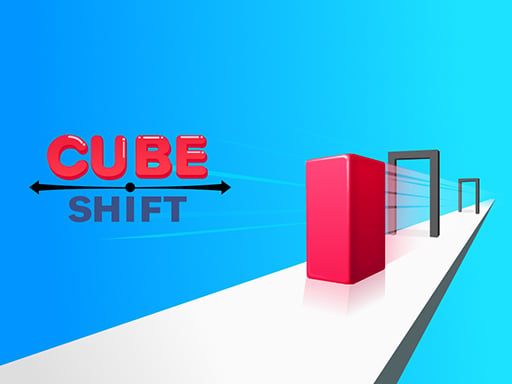
Cube Shift: The Ultimate Shape‑Shifting Sports Adventure
Ready to roll, twist, and conquer?
Cube Shift invites you into a vibrant world where a single cube becomes your ticket to endless sports‑style excitement. By simply mouse‑clicking, you control a cube that can tilt, flip, and morph to navigate a maze of obstacles, challenges, and adrenaline‑pumping courses—all rendered smoothly in HTML5 at a crisp 600 × 800 resolution.
Why Cube Shift Stands Out in the Sports Genre
In a sea of endless runners and action titles, Cube Shift cuts a niche of its own:
- Sports‑centric gameplay that blends classic parkour elements with tactical shape‑shifting.
- Dynamic obstacle design where every level demands quick thinking and faster reflexes.
- Pure, browser‑ready fun – no downloads, no installations, just play within minutes via a modern browser.
- Intuitive “Mouse To Play” controls – no complicated keybindings; click, drag, or touch.
The combination of sports thrill, shape‑shifting mechanics, and immersive HTML5 performance delivers a fresh experience that keeps players coming back for hours of addictive fun.
1. Game Overview
| Detail | Description |
|---|---|
| Title | Cube Shift |
| Category | Sports |
| Description | Change the cube’s shape to pass the obstacles. |
| Tags | fun, html5 |
| Controls | Mouse to play |
| Resolution | 600 × 800 |
| Platform | Browser (HTML5, JavaScript, Canvas) |
| Genre | Sports / Puzzle Action |
At its core, Cube Shift challenges you to guide a cube-shaped character through progressively difficult sports arenas. Each obstacle—whether a narrow gap, a spinning wheel, or a high‑speed ramp—requires a shift in the cube’s geometry to overcome. Think of it as a blend between Temple Run and Braid, but with a sports twist.
2. In‑Depth Gameplay Description
2.1 The Core Loop
- Start Line – The game loads a new track, displaying a brief start prompt.
- Run – Press & hold the mouse button or tap the screen. The cube continuously speeds forward.
- Shape Change – As soon as you release the mouse, the cube morphs into a different geometric shape (sphere, pyramid, prism, etc.). Each shape has unique physics properties—mass, bounce, and friction—affecting how it interacts with obstacles.
- Objective – Reach the finish line while avoiding or passing obstacles: moving bars, falling platforms, or quick‑change hurdles.
- Checkpoint & Score – Every 500 pixels, you earn points, and a checkpoint timer resets.
The subtlety lies in timing: you must know which shape best handles which obstacle. This forces players to plan ahead and make split decisions in real time.
2.2 Obstacles & Challenges
| Obstacle | Shape Needed | Why |
|---|---|---|
| Sloped Ramp | Sphere | Provides smooth rolling and minimal friction. |
| Spinning Bar | Prism | Flat surfaces help maintain balance on rotating bars. |
| Vertical Drop | Pyramid | Provides a sharp, controlled descent. |
| Gap | Cube | Straight edges allow predictable landing. |
| Moving Platform | Cylinder | Maintains a consistent trajectory with reduced bounce. |
Beyond static obstacles, Cube Shift introduces dynamic puzzles, such as timed platforms that open after a certain duration or rotating obstacles that change direction at intervals. These layered challenges keep gameplay refreshing and demand mastery over shape‑shifting.
2.3 Visual & Audio Atmosphere
- Colorful, Retro Aesthetic – Bright neon tones evoke classic arcade vibes yet feel modern.
- Dynamic Lighting – Shifts in color and intensity reflect the cube’s changing shape.
- Energetic Chiptune Beats – Sync with gameplay speed, rising intensity as challenges mount.
- Sound Effects – Shape‑change clicks, obstacle collisions, and finish‑line cheers.
Combined, these elements create a symphony of motion that feels like a sports event in a sci‑fi universe.
3. Key Features & Benefits
3.1 Shape‑Shifting Mastery
- Strategic Depth: Shifting from a cube to a sphere or a pyramid is not just a gimmick—it alters mass and collision responses, providing deeper strategic choices.
- Learning Curve: New players begin with simple obstacles, then adapt to advanced puzzles as they understand the physics.
3.2 Intuitive Mouse‑Based Controls
- Single‑Button Interaction: Pause or release to instantly change shape—no keyboard overhead.
- Touch‑Friendly: Optimized for mobile browsers; tapping replaces mouse clicks.
- Smooth Acceleration: Natural feel as the cube speeds up upon each click, mimicking real sports pacing.
3.3 High‑Quality HTML5 Performance
- Zero Downloads: Play instantly in the browser using Canvas, WebGL, or Canvas 2D.
- Cross‑Platform Compatibility: Windows, macOS, Linux, iOS, Android—all supported via modern browsers.
- Optimized for 600 × 800 Resolution: Ensures consistent performance on mid‑range hardware and lower‑bandwidth connections.
3.4 Replayability & Leaderboards
- Increasing Difficulty Levels: As you progress, new tracks introduce new shapes, obstacles, and time constraints.
- Score Tracking: Achieve personal bests. The leaderboard motivates players to improve.
3.5 Community & Social Integration
Though there are no external links or in‑game social networking, the game’s design encourages sharing high scores with friends informally, and the simple URL allows easy sharing across platforms.
4. Tips and Strategies
4.1 Master the Shape‑Change Timing
- Pay attention to the duration of each press. A quick tap works well for small obstacles; a longer hold may be needed for larger gaps.
- Observe the visual cues: a quick flash indicates the shape’s new orientation—use it as a subtle timer.
4.2 Learn Physics Patterns
- Observe how each shape reacts on different surfaces. Note that spheres roll quickly with minimal friction, but are harder to stop.
- Pyramids are good for sudden drops because of their sharp base, allowing precise control at the brink.
4.3 Use Momentum Wisely
- Build momentum by staying on flat tracks before a steep challenge. This can help you maintain speed through a difficult obstacle.
- However, momentum can be dangerous on slippery surfaces—release early to avoid overshooting.
4.4 Practice With the Demo
- If the game offers an interactive demo or “Practice Mode” (many HTML5 games implement this), spend 10–15 minutes experimenting with each shape before advancing.
4.5 Keep It Simple at First
- Don’t overload yourself with all shapes during early levels. Focus on mastering basic cube-to-sphere transitions before tackling complex physics.
4.6 Observe Timing Windows
- Some obstacles—especially moving platforms—have fixed time windows. Notice patterns in platform movement to anticipate openings.
5. Understanding HTML5 Gaming for Cube Shift
5.1 What Makes HTML5 Great for Sports Games
- Zero Installations: Players access games via any modern web browser without extra friction—a huge advantage for sports enthusiasts who crave instant play.
- Consistent Rendering: The Canvas API and WebGL provide consistent pixel-perfect graphics across desktop and mobile.
- Physics Engines: Libraries like Matter.js or Box2D.js can simulate realistic physics—exactly what Cube Shift needs for shape-shifting interactions.
- Responsive Input: HTML5’s event listeners respond natively to mouse, keyboard, and touch inputs, enabling smooth “Mouse to Play” mechanics.
5.2 Performance at 600 × 800
- This resolution is just the sweet spot: high enough for immersive visuals but low enough to maintain low latency on lower‑end devices.
- Games targeted at 600 × 800 can be scaled to higher resolutions on powerful devices, but the core gameplay remains the same.
5.3 Cross‑Platform Reach
- Desktop: Works on Chrome, Firefox, Edge, Safari – all mainstream browsers.
- Mobile: Because Cube Shift is based on web tech, it runs on iOS Safari and Android Chrome, or via the in‑app browsers of social platforms.
- Future Proofing: As browsers adopt WebGL 2.0 or WebGPU, the game can harness even more powerful rendering without rewriting.
6. Why Sports Enthusiasts Should Try Cube Shift
| Attribute | Value |
|---|---|
| Sports‑Like Energy | Fast pacing, obstacle avoidance, competitive scoring |
| Unique Twist | Shape‑shifting mechanics rare in sports titles |
| Accessibility | Browser‑based, no downloads, low hardware needs |
| Intuitive Control | Mouse/touch only, perfect for all ages |
| Replay Value | Progressive difficulty, leaderboards, endless challenges |
| Fun Factor | Retro‑style graphics, addictive gameplay loops |
Cube Shift appeals to sports gamers who crave more than simple run‑or‑jump mechanics. It marries sports competition with a physics puzzle that continually surprises. The game’s structure encourages players to refine both reflexes and strategic planning – a sweet spot for athletes keen on improving reaction times while enjoying an engaging, casual experience.
7. How to Start Playing
- Open a Modern Browser: Chrome, Edge, Firefox, Safari—or Safari on iOS.
- Navigate to the Game’s URL (provided by your gaming platform).
- Set the Resolution: The game auto‑fits to 600 × 800, but you can resize your window to see the responsive layout.
- Click or Touch: Start your run. Release to shift shapes.
- Score High: Beat the leaderboard by mastering the shape‑shifting mechanics.
Tip: Keep an eye on the shape preview at the bottom corner—this indicates the next shape you’ll switch to. Use it to anticipate and plan.
8. Final Thoughts and Call to Action
Cube Shift turns the classic sports gameplay formula on its head. By letting you change the cube’s shape to navigate obstacles, it invites players into a world where reflexes are matched by physics‑based strategy. The Mouse-to-Play control scheme makes it instantly accessible, while the HTML5 foundation guarantees smooth performance on any device at a sweet 600 × 800 resolution.
Whether you’re a casual gamer hunting for a quick pick‑up, a sports fanatic craving fresh challenges, or a developer curious about shape‑shifting mechanics, Cube Shift offers something unique and compelling.
Ready to twist, turn, and dominate your own sporting arena?
Click, shape, and score—your path to high scores and endless fun begins with Cube Shift. Drop into the game now, and let the shape‑shift symphony of sports excitement take over your world. Happy gaming!